Educational disclaimer. The antenna district is invented with a fixed seed and stands for no real network. CLI output, statuses, timings and printed values are snapshots from 24 to 29 September 2026, last run with qhubctl 2.2.4, and they will drift. The CLI's own
--helpand the linked Hub docs are the single source of truth.
1. init: bootstrap the service
qhubctl init writes a deployable Python service, and you paste in a best-gain greedy for a 12-site antenna district and run it locally.
2. serve: find the silent zero
Serve it on your machine, find out why the same program returns zero, and make the wrong input fail loudly.
3. up: deploy and read back
Deploy with up, run it as a service job, read the result with the SDK, and optionally run it through an agent or a workflow.
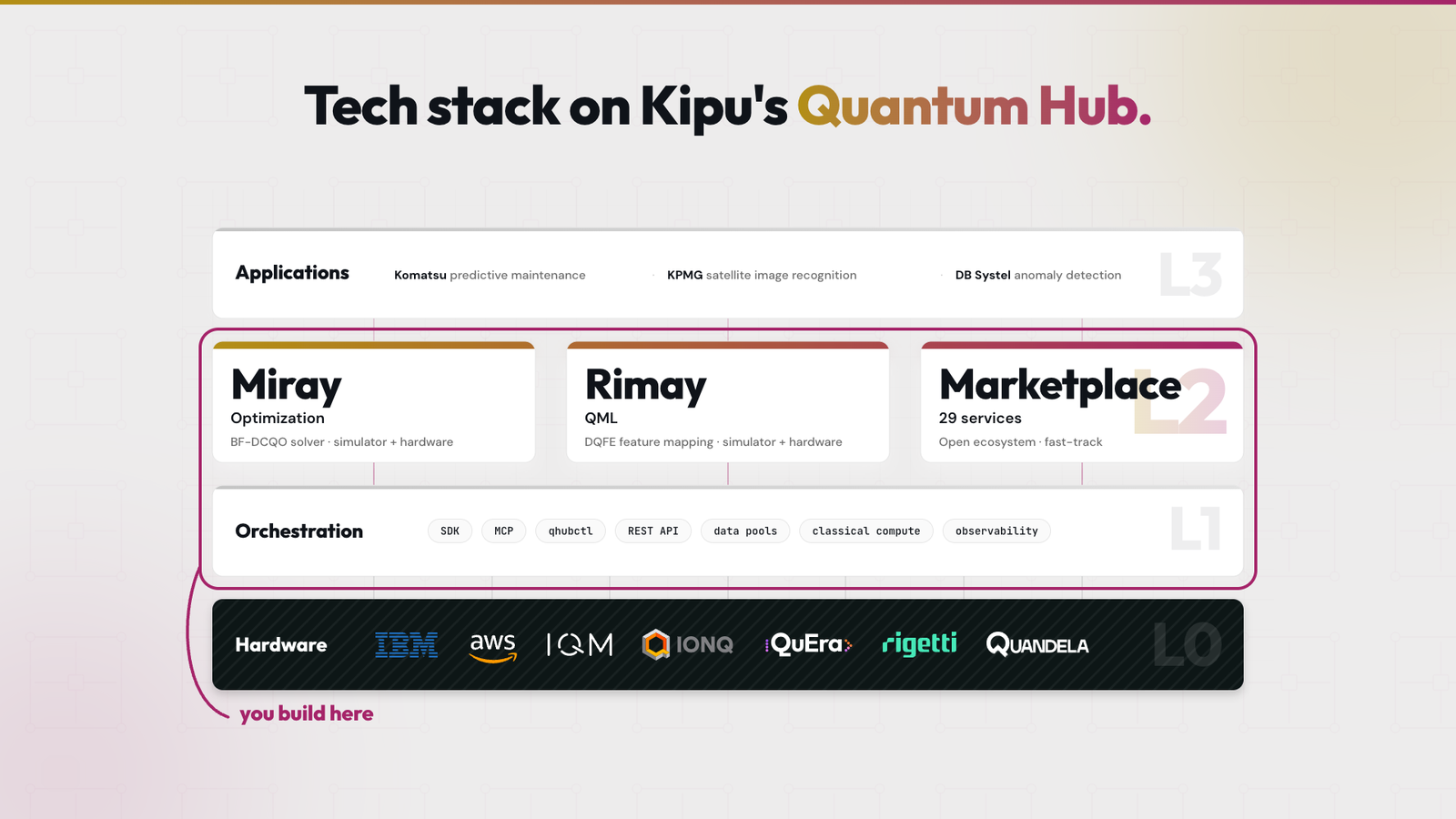
In this lab we slip into the role of a developer who ships a quantum-centric workflow as a Hub service. You already have an optimization algorithm that returns solutions on your laptop. So how do you serve that on the Hub without falling into its pitfalls, and without silent errors? We carry this one small service through the Hub's three controls: the qhubctl CLI to build and deploy, the qhub-api SDK to control, and the qhub-mcp server to make the service available for agents. Everything runs on a free Hub account.
You need: Sessions 1 to 3 (your first entangled circuit, the optimization lab, the machine learning lab), a free Hub account, uv with Python 3.11 or newer, Node.js 20 or newer, and qhubctl 2.2.4.
Step 5 is optional and needs an agent that can call the Hub's tools. Either request access to Paqari, Kipu's hosted agent, from the Kipu Academy team, or connect your own assistant to the Hub MCP server (see the MCP server docs).
The lab runs in three phases: build the service (Steps 1 and 2), test it locally (Step 3), then deploy it and read it back (Steps 4 and 5). Step 6 chains it with a second service in a workflow. Every task carries collapsed hints: Hint 1 says where to look, Hint 2 shows the shape of the answer, and the Solution closes it.
Step 0: Set up the environment
Setup: CLI, context, token, coding assistant
Install the CLI as the quickstart describes, create a personal access token, then log in and pick your personal account as the context:
npm install -g @quantum-hub/qhubctl
qhubctl --version
qhubctl login -t <your personal access token>
qhubctl list-contexts
qhubctl set-context <the id of your own personal account>
qhubctl get-context
export KQH_PERSONAL_ACCESS_TOKEN=<your personal access token>
You should see 2.2.4 for the version and Current context: <your name> (Personal) from get-context. list-contexts shows your personal account and every organization you belong to. This lab deploys only into your personal account. The export is for the SDK in Step 4; it keeps the token in your shell, out of the project folder that qhubctl up uploads.
Any coding assistant works. The starter that qhubctl init writes ships Claude Code skills and an MCP configuration, which Step 1 shows you.
Step 1: What does run() receive?
About 8 minutes.
qhubctl init writes a complete, deployable Python service. Before you change anything, find out how the Hub hands your code its input. Work in a folder of your own:
qhubctl init --name t4-antenna-greedy --non-interactive
cd t4-antenna-greedy
You should see a new folder that holds, among others, src/, input/ and qhub.json.
Three files matter in this lab. src/program.py holds InputData, InputParams and run(), the function the Hub calls. src/__main__.py is the local runner: python -m src calls run() on the files in input/ and writes to out/. qhub.json names the service and its runtime. init also writes .claude/skills/ with three Claude Code skills, among them kqh-service-builder on service structure, run() conventions, local testing and deployment, and a .mcp.json that registers the qhub-mcp server for Claude Code. The init reference and the runtime interface cover the rest.
Task 1. Predict: what does run() receive, and from where?
What do you think is happening here?
Hint 1, where to look
The signature of run() in src/program.py and the comments above InputData and InputParams. Then src/__main__.py.
Hint 2, the shape of the answer
run() takes two arguments, and each has a pydantic type. Count the files in input/, then match their names against the names of the parameters.
Solution
run(data: InputData, params: InputParams). Locally, python -m src reads the directory ./input and binds each file to the parameter of the same name. data.json becomes data and params.json becomes params, and each is validated by its model. So locally, data.json holds the district itself, flat, with no wrapper.
Keep one question open for Step 3. On the Hub the input arrives over HTTP as a single JSON body, so there are no files. What plays the role of the file name there?
Step 2: Does the service reach a solution on your laptop?
About 20 minutes.
The problem is antenna siting. There are 12 candidate sites, and each has a net value. Some pairs of sites overlap in coverage, and a pair costs a penalty when both are chosen. Three pairs are excluded outright. The goal is to maximise the total net value minus the overlap penalties. The solver is a classical greedy, because the lab is about the controls around it.
Paste the district and the lab's service over the starter: the three files below replace the starter's input/data.json, input/params.json and src/program.py.
The district: input/data.json
{"net_value": [29, 17, 22, 0, 12, 37, 14, 16, 34, 12, 24, 20], "overlap": {"0,4": 23, "0,7": 9, "0,8": 9, "1,3": 23, "1,7": 6, "2,6": 10, "2,8": 23, "3,6": 21, "3,9": 20, "4,5": 22, "5,11": 14, "6,10": 17, "8,10": 14, "8,11": 12}, "exclusions": [[0, 3], [2, 7], [5, 9]]}
The parameters: input/params.json
{}
The service: src/program.py
import time
from typing import Dict, List

from loguru import logger
from pydantic import BaseModel, Field


class InputData(BaseModel):
    """The antenna district, read from the `data` key of the job input.

    net_value:  one value per candidate site, indexed 0..n-1.
    overlap:    pairwise penalty keyed "i,j" with i < j, paid when both sites are chosen.
    exclusions: pairs [i, j] that must never both be chosen.
    """

    net_value: List[float] = Field(default_factory=list)
    overlap: Dict[str, float] = Field(default_factory=dict)
    exclusions: List[List[int]] = Field(default_factory=list)


class InputParams(BaseModel):
    """Read from the `params` key of the job input. Empty in this lab."""

    pass


class CalculationResult(BaseModel):
    chosen_sites: List[int]
    objective: float
    elapsed_time: float


def _parse_overlap(overlap: Dict[str, float]) -> Dict[tuple, float]:
    """Turn {"i,j": w} into {(i, j): w} with integer keys."""
    return {tuple(sorted(int(x) for x in k.split(","))): w for k, w in overlap.items()}


def _objective(chosen: set, net_value: List[float], overlap: Dict[tuple, float]) -> float:
    """Sum of net_value over chosen sites, minus w for every overlap pair with both sites chosen."""
    penalty = sum(w for (i, j), w in overlap.items() if i in chosen and j in chosen)
    return sum(net_value[i] for i in chosen) - penalty


def _feasible(i: int, chosen: set, exclusions: List[List[int]]) -> bool:
    """False if site i forms an excluded pair with any site already chosen."""
    return not any((a == i and b in chosen) or (b == i and a in chosen) for a, b in exclusions)


def run(data: InputData, params: InputParams) -> CalculationResult:
    """Best-gain greedy for antenna siting.

    Start with no sites. At each step add the feasible site with the largest
    positive marginal gain to sum(net_value_i x_i) - sum(w_ij x_i x_j), never
    selecting both sites of an excluded pair. Stop when no remaining site has
    a positive gain.
    """
    start_time = time.time()
    chosen: set = set()
    obj = 0.0

    overlap = _parse_overlap(data.overlap)
    while True:
        best_gain, best_i = 0.0, None
        for i in range(len(data.net_value)):
            if i in chosen or not _feasible(i, chosen, data.exclusions):
                continue
            gain = data.net_value[i] - sum(
                overlap.get((min(i, j), max(i, j)), 0.0) for j in chosen
            )
            if gain > best_gain:
                best_gain, best_i = gain, i
        if best_i is None:
            break
        chosen.add(best_i)
    obj = _objective(chosen, data.net_value, overlap)

    elapsed_time = time.time() - start_time
    logger.debug(f"Chosen sites: {sorted(chosen)}, objective: {obj}")

    return CalculationResult(
        chosen_sites=sorted(chosen),
        objective=obj,
        elapsed_time=elapsed_time,
    )
The greedy is written: it starts with no sites, adds the feasible site with the largest positive gain, and stops when no site adds value. The docstring of run() states it. Your job in this lab is to run it, first on your laptop, then on the Hub.
Task 2. Run the service locally.
uv run python -m src
You should see this in out/output.json:
"chosen_sites": [0, 1, 5, 6, 7, 8],
"objective": 123.0,
The objective is 123. It is a good plan, but not the best one. Checking every plan by brute force finds an optimum of 135, so the greedy leaves 12 on the table. That gap does not matter until Step 6, because here the greedy is only the payload.
Step 3: Why does the same program return 0 when served?
About 12 minutes.
qhubctl serve runs your project on your machine and, in its own words, exposes the same HTTP endpoints as Kipu Quantum Hub. Start it in one terminal and leave it running:
qhubctl serve
It listens on http://localhost:8081, and http://localhost:8081/docs lists the endpoints.
On the first start, serve runs uv add --dev --upgrade qhub-serve, which changes pyproject.toml and uv.lock. Leave those changes in place, because the Hub build copes with them. The endpoints are the Hub's: POST / starts a job, GET /<id> reads its status, and GET /<id>/result its result. Errors from your code print in the serve terminal, not in the curl response.
Before you send: what objective do you expect back? Then, from a second terminal in the project folder, send the district:
curl -s -i -X POST http://localhost:8081/ -H 'Content-Type: application/json' -d @input/data.json
The first line of the answer is HTTP/1.1 201 Created, and the body carries an id and "status":"PENDING". Wait a few seconds, then ask for the status and the result:
curl -s http://localhost:8081/<id>
curl -s http://localhost:8081/<id>/result
You should see "status":"SUCCEEDED", and a result that says "chosen_sites":[],"objective":0.0.
Same program, same district: python -m src returned 123, and serve returned 0 with no sites. What is different?
What is different, and the fix
On the Hub, and on serve, each top-level key of the JSON body is bound to the run() parameter of the same name. The body you sent has three top-level keys, net_value, overlap and exclusions, and none of them is called data. So data falls back to an empty InputData: every field takes its default_factory value and becomes empty. The greedy has nothing to choose, and the job succeeds with objective 0. The program is correct, and the input never reached it.
The fix is the job envelope, one key per parameter. Save this as input/job.json, the same district in that shape:
{"data": {"net_value": [29, 17, 22, 0, 12, 37, 14, 16, 34, 12, 24, 20], "overlap": {"0,4": 23, "0,7": 9, "0,8": 9, "1,3": 23, "1,7": 6, "2,6": 10, "2,8": 23, "3,6": 21, "3,9": 20, "4,5": 22, "5,11": 14, "6,10": 17, "8,10": 14, "8,11": 12}, "exclusions": [[0, 3], [2, 7], [5, 9]]}, "params": {}}
curl -s -X POST http://localhost:8081/ -H 'Content-Type: application/json' -d @input/job.json
curl -s http://localhost:8081/<id>/result
The result now says "chosen_sites":[0,1,5,6,7,8],"objective":123.0. Keep input/data.json flat, because python -m src reads it as the data file itself.
Task 3. Change one thing in InputData so that the same wrong body fails loudly instead of returning 0. Save, then post input/data.json again.
What do you think is happening here?
Hint 1, where to look
The three Field(default_factory=...) declarations in InputData.
Hint 2, the shape of the answer
In pydantic, a field with no default is required. Validating {} against a model with required fields cannot succeed.
Solution
Drop the three defaults, and the now unused Field import. The full src/program.py:
import time
from typing import Dict, List

from loguru import logger
from pydantic import BaseModel


class InputData(BaseModel):
    """The antenna district, read from the `data` key of the job input.

    net_value:  one value per candidate site, indexed 0..n-1.
    overlap:    pairwise penalty keyed "i,j" with i < j, paid when both sites are chosen.
    exclusions: pairs [i, j] that must never both be chosen.
    """

    net_value: List[float]
    overlap: Dict[str, float]
    exclusions: List[List[int]]


class InputParams(BaseModel):
    """Read from the `params` key of the job input. Empty in this lab."""

    pass


class CalculationResult(BaseModel):
    chosen_sites: List[int]
    objective: float
    elapsed_time: float


def _parse_overlap(overlap: Dict[str, float]) -> Dict[tuple, float]:
    """Turn {"i,j": w} into {(i, j): w} with integer keys."""
    return {tuple(sorted(int(x) for x in k.split(","))): w for k, w in overlap.items()}


def _objective(chosen: set, net_value: List[float], overlap: Dict[tuple, float]) -> float:
    """Sum of net_value over chosen sites, minus w for every overlap pair with both sites chosen."""
    penalty = sum(w for (i, j), w in overlap.items() if i in chosen and j in chosen)
    return sum(net_value[i] for i in chosen) - penalty


def _feasible(i: int, chosen: set, exclusions: List[List[int]]) -> bool:
    """False if site i forms an excluded pair with any site already chosen."""
    return not any((a == i and b in chosen) or (b == i and a in chosen) for a, b in exclusions)


def run(data: InputData, params: InputParams) -> CalculationResult:
    """Best-gain greedy for antenna siting.

    Start with no sites. At each step add the feasible site with the largest
    positive marginal gain to sum(net_value_i x_i) - sum(w_ij x_i x_j), never
    selecting both sites of an excluded pair. Stop when no remaining site has
    a positive gain.
    """
    start_time = time.time()
    chosen: set = set()
    obj = 0.0

    overlap = _parse_overlap(data.overlap)
    while True:
        best_gain, best_i = 0.0, None
        for i in range(len(data.net_value)):
            if i in chosen or not _feasible(i, chosen, data.exclusions):
                continue
            gain = data.net_value[i] - sum(
                overlap.get((min(i, j), max(i, j)), 0.0) for j in chosen
            )
            if gain > best_gain:
                best_gain, best_i = gain, i
        if best_i is None:
            break
        chosen.add(best_i)
    obj = _objective(chosen, data.net_value, overlap)

    elapsed_time = time.time() - start_time
    logger.debug(f"Chosen sites: {sorted(chosen)}, objective: {obj}")

    return CalculationResult(
        chosen_sites=sorted(chosen),
        objective=obj,
        elapsed_time=elapsed_time,
    )
serve reloads by itself when you save. Repost input/data.json. POST / still answers 201, because it accepts the job before your code runs. GET /<id> now reports "status":"FAILED", and the result carries no chosen_sites. The reason prints in the serve terminal:
ERROR | qhub_serve.entrypoint:run_entrypoint_wrapper:64 - 3 validation errors for InputData
net_value
  Field required [type=missing, input_value={}, input_type=dict]
The same error follows for overlap and exclusions. input_value={} is the empty stand-in from above, which the error now shows you. input/job.json still returns 123. Deploy this version in Step 4: a wrong body now costs you a FAILED status and a readable error, not a plausible zero.
You might expect the whole body to arrive as run()'s data. It doesn't: the Hub binds each top-level key of the body to the run() parameter of the same name, so the district goes inside a data key, the job envelope.
Step 4: What does qhubctl run send once the service is on the Hub?
About 15 minutes.
Check the context first, every time. qhubctl deploys into whichever account it was last left in, and qhubctl has no command to delete a service. A service created in the wrong organization stays there until someone removes it by other means.
qhubctl openapi
qhubctl get-context
qhubctl up
qhubctl openapi reads the types in run() and writes openapi.yaml, and up uploads that file as the service's API description. Its POST / request body, trimmed:
properties:
  data:
    title: InputData      # after Task 3: requires net_value, overlap, exclusions
  params:
    title: InputParams
required:
- data
- params
up creates the service, uploads the project and builds it. One build takes 149 to 177 seconds, so up takes about 2.5 to 3 minutes in all. up saves the new serviceId into qhub.json, so a second up updates the same service. qhubctl up --help lists the options, and the up reference and the build logs are the first place to look if a build fails. Work on Task 4a while the build runs.
You should see Service created, and in the Hub, under Services, your service with the status "Service created".
Task 4a. Predict: a plain qhubctl run, with no options, sends input/data.json and input/params.json. What body arrives at your service, and what comes back?
What do you think is happening here?
Hint 1, where to look
qhubctl run --help, the line for --input-files: its default, and the word it uses for what happens to the files. The run reference says the same.
Hint 2, the shape of the answer
The files are merged. Merge a flat district object with {} into one object: which keys end up at the top level?
Solution
qhubctl merges the contents of the input files into one object and sends the result unchanged. It does not key them by file name. The flat district merged with {} is the flat district, which is the wrong body from Step 3. On the build from Task 3, the job fails with the ValidationError, and run prints Job failed. with a link to the job in the Hub. On the default_factory build, it would have succeeded with 0.
Point --input-files at the envelope:
qhubctl get-context
qhubctl run --input-files input/job.json --tag t4-greedy --detached
run reads the service id from qhub.json and prints Job (<job-id>) created. Copy that id. You can also start the same job in the Hub: on the service's page, choose Run Service and give it the contents of input/job.json as manual JSON input. A blocking run, without --detached, prints Job succeeded. and a link, but not the result: qhubctl has no command that reads a job's result, so the job id is your handle for Task 4b.
Task 4b. Read your job back with the SDK.
Hint 1, where to look
The job id that run --detached printed is also the execution id. In qhub-api, service_jobs gives the status, and service_executions gives the execution and its result.
Solution
Save this as readback.py next to your service folder, not inside it, so up never uploads it. The header lets uv install qhub-api for you:
# /// script
# requires-python = ">=3.11"
# dependencies = ["qhub-api"]
# ///
import os, sys, time
from qhub.api.platform.client import HubPlatformClient

client = HubPlatformClient(api_key=os.environ["KQH_PERSONAL_ACCESS_TOKEN"])
job_id = sys.argv[1]

while (status := str(client.service_jobs.get_service_job(id=job_id).status)) not in ("SUCCEEDED", "FAILED", "CANCELLED"):
    print(status)
    time.sleep(5)

execution = client.service_executions.get_service_execution(id=job_id)
print("execution", execution.id, execution.status)
if status == "SUCCEEDED":
    result = client.service_executions.get_service_execution_result(id=job_id)
    print("objective", result["objective"], "sites", result["chosen_sites"])
cd ..
uv run readback.py <job-id>
The script only reads: it polls the job every 5 s until it is terminal, because the result exists only then, and prints:
execution <job-id> SUCCEEDED
objective 123.0 sites [0, 1, 5, 6, 7, 8]
A fresh job prints PENDING and RUNNING lines first.
Step 5: Can an agent recover from the same mistake? (optional)
About 5 minutes.
An agent on the Hub MCP calls the Hub's hub_* tools for you. This time you give it a goal, not a body: the flat district, which broke serve and run, and no word about the envelope.
Before you send: what body will the agent send first, and what will it do if the job fails?
Then ask your assistant, from your service folder, or Paqari, pasting the contents of input/data.json after the prompt. If you gave your service another name in Step 1, swap it in:
Run my Hub service t4-antenna-greedy on the antenna district in input/data.json and tell me the objective, the chosen sites and the execution ID. Only run it; do not create, rebuild, publish or change any service. At the end, quote every input you sent to the Hub.
Paqari's interface hides the arguments of the tools it calls, which is why the prompt asks for them.
What happened when this was written
Three fresh sessions, 25 September 2026. Every time, Paqari sent the flat body first, and the job FAILED with the ValidationError from Task 3. Every time, it then read the execution logs, fetched the service's OpenAPI spec (the one qhubctl openapi wrote in Step 4), resent the input as {"data": {...}, "params": {}}, and returned objective 123 with sites [0, 1, 5, 6, 7, 8]. Each session took 1 min 23 s to 1 min 37 s, and none offered to publish.
The spec did not make the first call right. It turned the failure into one Paqari could read and fix. The envelope met three callers today: serve, fixed with input/job.json; qhubctl run, fixed with --input-files input/job.json; and the agent, fixed by the spec you generated. The FAILED first job stays in your history. That is expected.
Other assistants were not tested on the recovery. Yours may get the body right first time, or fail differently.
If the agent offers to publish your service, say no; a CREATED service runs as a service job. The Hub MCP also carries publish and delete tools, so if your assistant asks you to approve tool calls, approve only the job run and reads.
If every run call fails with 400 Input must be a JSON object, whatever the input, your client sent the job input as text rather than as a JSON object. Claude Code did this on 29 September 2026. Use Paqari, or run the job yourself with qhubctl run as in Step 4.
Step 6: Chain it with a second service in a workflow (optional)
Your greedy returns 123, and Step 2 said the optimum is 135. A second service can say so on every run: a plan checker takes the district and a plan, and returns whether the plan is feasible, its objective, the optimum found by trying all 2^n plans, and the gap. A workflow chains the two, so one job runs the greedy and hands its plan to the checker.
Build the checker the way you built the greedy, in a folder next to it, with lighter hints this time:
qhubctl init --name t4-plan-checker --non-interactive
cd t4-plan-checker
The checker: src/program.py
from itertools import combinations
from typing import Dict, List

from pydantic import BaseModel

class InputData(BaseModel):
    """The district from Step 2 plus the plan to check."""

    net_value: List[float]
    overlap: Dict[str, float]
    exclusions: List[List[int]]
    chosen_sites: List[int]

class InputParams(BaseModel):
    pass

class CheckResult(BaseModel):
    feasible: bool
    objective: float
    optimum: float
    optimal_sites: List[int]
    gap: float

def _objective(sites, data: InputData) -> float:
    s = set(sites)
    penalty = sum(w for k, w in data.overlap.items() if {int(x) for x in k.split(",")} <= s)
    return sum(data.net_value[i] for i in s) - penalty

def _feasible(sites, data: InputData) -> bool:
    s = set(sites)
    return not any(a in s and b in s for a, b in data.exclusions)

def run(data: InputData, params: InputParams) -> CheckResult:
    """Check a plan and compare it with the best plan, found by trying all 2^n of them."""
    n = len(data.net_value)
    plans = [p for r in range(n + 1) for p in combinations(range(n), r) if _feasible(p, data)]
    best = max(plans, key=lambda p: _objective(p, data))
    objective, optimum = _objective(data.chosen_sites, data), _objective(best, data)
    return CheckResult(
        feasible=_feasible(data.chosen_sites, data),
        objective=objective,
        optimum=optimum,
        optimal_sites=list(best),
        gap=optimum - objective,
    )
The checker's input/data.json and input/params.json
input/data.json is the district plus your greedy's plan:
{"net_value": [29, 17, 22, 0, 12, 37, 14, 16, 34, 12, 24, 20], "overlap": {"0,4": 23, "0,7": 9, "0,8": 9, "1,3": 23, "1,7": 6, "2,6": 10, "2,8": 23, "3,6": 21, "3,9": 20, "4,5": 22, "5,11": 14, "6,10": 17, "8,10": 14, "8,11": 12}, "exclusions": [[0, 3], [2, 7], [5, 9]], "chosen_sites": [0, 1, 5, 6, 7, 8]}
input/params.json is {}.
Run it locally, then deploy it:
uv run python -m src
qhubctl openapi
qhubctl get-context
qhubctl up
out/output.json shows feasible true, objective 123.0, optimum 135.0 and gap 12.0. As in Step 4, get-context must name your personal account before up.
A workflow calls services through a subscription, so both services need one. On each service's page, choose Publish Service, then Internal: the service stays off the Marketplace and becomes available to your own applications. Then create an Application and subscribe it to both services. Using a service walks through both, click by click. A free account allows three internal publications, and this step uses two.
Now build the workflow in the Hub's modeler, as the workflow introduction describes:
- A start event. The workflow's input is one variable,
district, holding the district. - A service task "Greedy plan" that calls
t4-antenna-greedythrough your subscription. Its input mapping: local variable namedata, variable assignment value=district. Its output mapping:greedySitesfrom=chosen_sites. - A service task "Check the plan" that calls
t4-plan-checker. - An end event.
Task 6. Predict: what input mapping does "Check the plan" need?
What do you think is happening here?
Hint 1, where to look
Step 3. The service task hands its inputs to run() the way serve did: one key per parameter. Which parameter needs something here, and what does the checker's InputData require?
Hint 2, the shape of the answer
One mapping, named after a parameter of run(). Its value is a FEEL context, ={key: value, ...}, built from two variables you already have.
Solution
The envelope again. Local variable name data, and a value that builds the checker's InputData from the district and the greedy's plan:
={net_value: district.net_value, overlap: district.overlap, exclusions: district.exclusions, chosen_sites: greedySites}
params needs no mapping: the checker ran without one. A variable that does not exist in the workflow fails the task with NO_VARIABLE_FOUND, so the start variable must be called exactly district.
Deploy the workflow and run it. The Run form has no fields, because the workflow carries no API description, so choose Manual JSON input and paste the district under its variable name:
{"district": {"net_value": [29, 17, 22, 0, 12, 37, 14, 16, 34, 12, 24, 20], "overlap": {"0,4": 23, "0,7": 9, "0,8": 9, "1,3": 23, "1,7": 6, "2,6": 10, "2,8": 23, "3,6": 21, "3,9": 20, "4,5": 22, "5,11": 14, "6,10": 17, "8,10": 14, "8,11": 12}, "exclusions": [[0, 3], [2, 7], [5, 9]]}}
You should see both tasks succeed. Open the checker's execution under Service Executions: feasible true, objective 123, optimum 135, optimal_sites [0, 1, 2, 5, 10, 11] and gap 12. The run took 24 s on 29 September 2026. The workflow's own result stays empty unless its end event maps variables out; the air traffic tutorial builds a longer workflow that does.
The gap of 12 is the opening for the hand-off below: a better solver in the first task closes it, and the checker tells you on every run.
In a nutshell, building a service happens in three steps: init, serve and up, and qhubctl run allows you to test it. Users and agents can read your specifications and submit a suitable problem to your solver. Intelligent input and error handling speeds up any debugging process and guides users to the solution. Any other service can be built on the Kipu Quantum Hub similarly, either as an individual solver or as an orchestration of solvers in a workflow. Publishing a service makes it available to other users, their code and their agents.
Apply what you learned: swap the greedy solver for a quantum solver, or chain it into a workflow. The possibilities of your first quantum-centric application are vast. If you take one piece of advice from us, start from your recent work. Where could you apply this technology? Build it in a domain you already know. The next step is yours.
- Publish on the Marketplace, so other users can subscribe to your service.
- Use a service from an application, the way their code will call yours.
in·dus·tri·al quan·tum use·ful·ness
/ɪnˈdʌs.tri.əl ˈkwɑn.təm ˈjuːs.fəl.nəs/noun
- 1
a quantum application that is implementable and commercially valuable.
- 2
the Kipu Academy is the place to learn about them.
- 3
the Kipu Quantum Hub is the tool to reach it.
- 4
the service you build on the Hub, which users and agents call on its own or inside a hybrid quantum-classical workflow.
Documentation: Kipu Quantum Hub | Hub docs | Quickstart | CLI reference | MCP server | Access tokens | Workflows | Paqari